Working with multi-module Maven project

Maven Module :
Maven module is a Maven Sub Project. So, to have a Maven module, first you need to have a Maven Parent Project.
In this parent project, you need to enable the packaging as โ€œpomโ€œ.

Once you create the parent project create Modules as follows,
[Right click on the parent project created] > New > Other > [Maven]
Maven Module


Archetype :
You can create the project as a simple one, by passing the archetype. Otherwise, select the relevant arche-type.
eg : maven-archetype-quickstart

Archetype is a Maven project templating toolkit. An archetype is defined as an original pattern or model from which all other things of the same kind are made.
We use this to generate different types of projects such as war, jar, ear etc easily.


Aggregator POM / Parent POM :

A multi-module project is built from an aggregator POM that manages a group of submodules.
Here, a top-level module serving for joining multiple modules under one roof is called aggregator and aggegator does not include any information about dependencies. Aggregator has a small difference with parent pom. The source of to-be-inherited information about libraries and plugins is known as a parent POM. So, unlike aggregator, parent pom, includes all the properties, dependencyManagement and pluginManagement sections.

Normally, all configuration with dependencies are included to the parent pom and set it as the parent of the child modules, so theyโ€™ll inherit from it.

Submodules are regular Maven projects, and they can be built separately or through the aggregator POM.
It aggregates the projects as below

Parent / Aggregator POM :

<project xmlns="http://maven.apache.org/POM/4.0.0"
	xmlns:xsi="http://www.w3.org/2001/XMLSchema-instance"
	xsi:schemaLocation="http://maven.apache.org/POM/4.0.0 https://maven.apache.org/xsd/maven-4.0.0.xsd">
	<modelVersion>4.0.0</modelVersion>
	<groupId>blog.code.knowledgehunting.corejava</groupId>
	<artifactId>ParentApp</artifactId>
	<version>0.0.1-SNAPSHOT</version>
	<packaging>pom</packaging>

	<modules>
		<module>ChildApp1</module>
		<module>ChildApp2</module>
		<module>ChildApp3</module>
	</modules>

</project>

ChildApp1 โ€“ pom.xml

<project xmlns="http://maven.apache.org/POM/4.0.0" xmlns:xsi="http://www.w3.org/2001/XMLSchema-instance" xsi:schemaLocation="http://maven.apache.org/POM/4.0.0 https://maven.apache.org/xsd/maven-4.0.0.xsd">
  <modelVersion>4.0.0</modelVersion>
  <parent>
    <groupId>blog.code.knowledgehunting.corejava</groupId>
    <artifactId>ParentApp</artifactId>
    <version>0.0.1-SNAPSHOT</version>
  </parent>
  <artifactId>ChildApp1</artifactId>
</project>

Benifits of multi module projects :

  • Reduce duplication.
  • Build multiple modules inlined to mavenโ€™s build life cycle. here, applicationโ€™s modules can be built in a single command.
  • Share a vast amount of configuration with other modules.

Mavenโ€™s build life cycle :

Mavenโ€™s build life cucle contains following like default pifecycle phases

  • validate โ€“ validate the project is correct and all necessary information is available
  • compile โ€“ compile the source code of the project
  • test โ€“ test the compiled source code using a suitable unit testing framework. These tests should not require the code be packaged or deployed
  • package โ€“ take the compiled code and package it in its distributable format, such as a JAR.
  • verify โ€“ run any checks on results of integration tests to ensure quality criteria are met
  • install โ€“ install the package into the local repository, for use as a dependency in other projects locally
  • deploy โ€“ done in the build environment, copies the final package to the remote repository for sharing with other developers and projects.

Code : https://bitbucket.org/namalfernando/parentapp/src/master/


References :

  1. https://docs.jboss.org/tools/4.1.0.Final/en/maven_reference/html/creating_a_maven_application.html
  2. https://maven.apache.org/guides/introduction/introduction-to-archetypes.html
  3. http://rostislav-matl.blogspot.com/2011/12/maven-aggregator-vs-parent.html
  4. https://maven.apache.org/guides/introduction/introduction-to-the-lifecycle.html
  5. https://www.youtube.com/watch?v=28fsqKNjxrc
#eclipse, #maven

Enabling DEBUG only for some packages and restrict all others in log4j

In this case, first need to understand the how log level (org.apache.log4j.Level) works. There are eight log leveles defines in the framework and you can also define your custom levels by sub-classing the Level class.

Here, the โ€œRestrictive Levelโ€ of a Logger level is determined by considering itโ€™s โ€œintLevelโ€ value. Higher the intLevel, lower the Restrictive Level.

Restrictive LevelintLevelLevelDescription
0Integer.MAX_VALUE
ALLAll levels including custom levels.
1600TRACEFiner-grained informational events than the DEBUG
2500DEBUGUseful to debug an application
3400INFOHighlight the progress of the application at coarse-grained level
4300WARNHighlight potentially harmful situations.
5200ERRORHighlight the error events that might still allow the application to continue running.
6100FATALHighlight very severe error events that will presumably lead the application to abort.
70OFFHighest possible rank / restrctive level and is intended to turn off logging.

In logger configuration, root-logger is for system wide. Package level configuration can be defined under logger@category/level@name.

So, to get this done, we give more restrictive level to root-logger and give less restrictive levels to specified packages through logger@category/level@name.

eg :
com.some.package โ€“ > DEBUG
In this package all the log levels below and including DEBUG will be logged. (eg : DEBUG, INFO, WARN, ERROR etc)

com.some.another.package โ€“ > INFO
In this package all the log levels below and including INFO will be logged. (eg : INFO, WARN, ERROR etc). But DEBUGs within this packages will not be logged

com.some.unwanted.package โ€“ > ERROR
In this package all the log levels below and including ERROR will be logged. This is mostly like ERROR only (eg : ERROR, FATAL, OFF, TRACE etc)

root -> INFO
Since root level is INFO, all the log levels below and including INFO will be logged (eg : INFO, WARN, ERROR etc) but DEBUGs will not be logged unless they have not been specified above

eg :

<subsystem xmlns="urn:jboss:domain:logging:6.0">
    <console-handler name="CONSOLE">
        <formatter>
            <named-formatter name="COLOR-PATTERN"/>
        </formatter>
    </console-handler>
    <periodic-rotating-file-handler name="FILE" autoflush="true">
        <formatter>
            <named-formatter name="PATTERN"/>
        </formatter>
        <file relative-to="jboss.server.log.dir" path="server.log"/>
        <suffix value=".yyyy-MM-dd"/>
        <append value="true"/>
    </periodic-rotating-file-handler>
    <logger category="com.some.package ">
        <level name="INFO"/>
    </logger>
    <logger category="com.some.another.package">
        <level name="INFO"/>
    </logger>
    <logger category="com.some.unwanted.package ">
        <level name="ERROR"/>
    </logger>
    <root-logger>
        <level name="INFO"/>
        <handlers>
            <handler name="CONSOLE"/>
            <handler name="FILE"/>
        </handlers>
    </root-logger>
    <formatter name="PATTERN">
        <pattern-formatter pattern="%d{yyyy-MM-dd HH:mm:ss,SSS} %-5p [%c] %s%e%n"/>
    </formatter>
    <formatter name="COLOR-PATTERN">
        <pattern-formatter pattern="%K{level}%d{HH:mm:ss,SSS} %-5p [%c] %s%e%n"/>
    </formatter>
</subsystem>

References :

  • https://logging.apache.org/log4j/2.x/manual/customloglevels.html
  • https://www.tutorialspoint.com/log4j/log4j_logging_levels.htm

#log4j, #logging, #wildfly

Important tail commands

Outputs the last 10 lines of the file myfile.txt. Default is 10 lines.

tail /path/to/file/myfile.log

Outputs the last 100 lines of the file myfile.txt.

tail -n 100 /path/to/file/myfile.log 

Outputs the last 10 lines of myfile.txt, and keep follow on myfile.txt for updates; Here, -f option โ€œwhich stands for followโ€ will keep the stream goingโ€ฆ

tail -f /path/to/file/myfile.log

Selectively keep follow a log file in real time.

tail -f /path/to/file/myfile.log | grep 24.10.160.10

Outputs the last 10 lines of myfile.txt, and keep follow on myfile.txt for updates with a sleep interval. Here, -s option is for โ€œsleepโ€ and specify the sleep interval

tail -f -s 5 /path/to/file/myfile.log

We can use this to in conjunction with different other commands

ps aux | sort -nk +3 | tail -5

References :

  • https://www.howtogeek.com/481766/how-to-use-the-tail-command-on-linux/

#bash, #tail

Important vi commands

Starting vi

  • vi filename : edit filename starting at line 1
  • vi -r filename : recover filename that was being edited when system crashed

Navigating

  • ^f : move forward one screen
  • ^b : move backward one screen
  • ^d : move down (forward) one half screen
  • ^u : move up (back) one half screen

Searching Text

  • /string : search forward for occurrence of string in text
  • ?string : search backward for occurrence of string in text
  • n : move to next occurrence of search string
  • N : move to next occurrence of search string in opposite direction

Adding / Changing / Deleting text

  • i : insert text before cursor, until hit
  • I : insert text at beginning of current line, until hit
  • a : append text after cursor, until hit
  • A : append text to end of current line, until hit
  • o : open and put text in a new line below current line, until hit
  • O : open and put text in a new line above current line, until hit

Cutting and Pasting Text

  • yy : copy (yank, cut) the current line into the buffer
  • Nyy or yNy : copy (yank, cut) the next N lines, including the current line, into the buffer
  • p : put (paste) the line(s) in the buffer into the text after the current line

Exit vi

  • : x ENTER : quit vi, writing out modified file to file named in original invocation
  • :wq ENTER : quit vi, writing out modified file to file named in original invocation
  • :q ENTER : quit (or exit) vi
  • :q! ENTER : quit vi even though latest changes have not been saved for this vi call

References :

  • https://www.cs.colostate.edu/helpdocs/vi.html

#bash, #vi

Finding files in side a jar

List all files in jar-file-name.jar whose name is start with โ€œSomeFileNameโ€

jar -tvf jar-file-name.jar | grep "SomeFileName"

List all files in a jar order by size

jar -tvf jar-file-name.jar | sort -n -r

List all the classes contains the class name with package structure.

find filePath -name '*.jar' | xargs -I @ jar -tvf @ | grep ClassName
find filePath -name '*.jar' | xargs -I @ jar -tvf @ | grep /ClassName

Search and print the jar names and if the class exists then print the class name.

find filePath -name '*.jar' | while read F; do (echo $F; jar -tvf $F | grep ClassName.class) done

Search and print the jar name if the class exsists then prints the class name. (exact match only)

find filePath -name '*.jar' | while read F; do (echo $F; jar -tvf $F | grep /ClassName.class) done

#bash, #find, #jar, #search

Speedup coding with eclipse editor templates

In eclipse IDE go toโ€ฆ

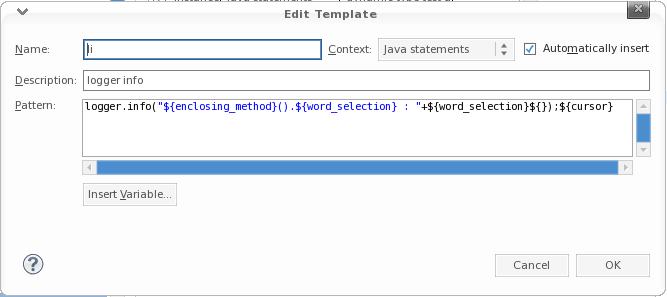
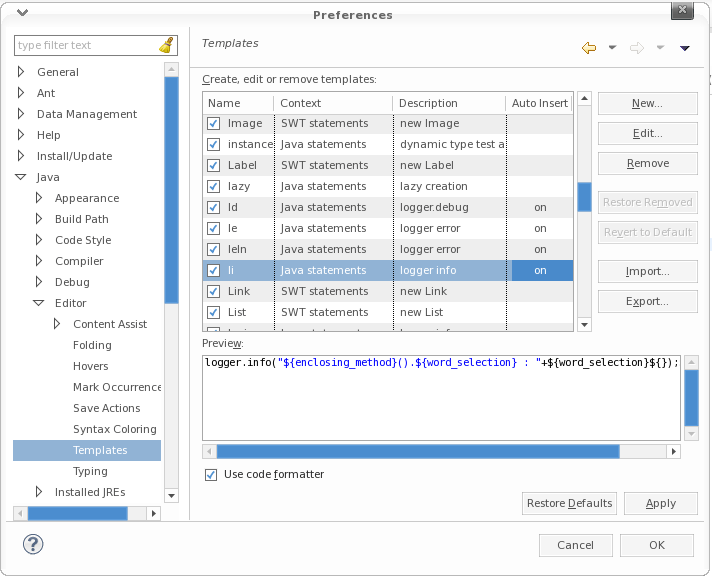
  1. Windows > Preferences
  2. Java > Editor > Templates
  3. Create a new template OR select the Existing one to edit
  4. Add this pattern in there
logger.info("${enclosing_method}().${word_selection} : " + ${word_selection}${});${cursor}

References :

  • http://poojapainter11.wordpress.com/2013/08/10/eclipse-shortcuts/
  • http://www.grobmeier.de/log4j-2-performance-close-to-insane-20072013.html
  • http://eannaburke.wordpress.com/2013/06/28/a-rudimentary-logger/

#eclipse, #ide, #utility

Find/Replace in eclipse using regex

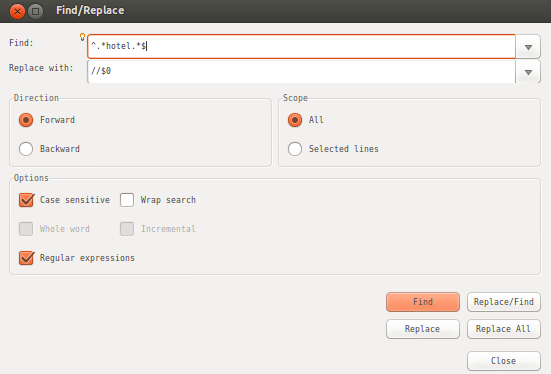
We can find a regex pattern and do a replace as mentioned below. This is very helpful when we are doing bulk replacing.
eg : Comment all the lines containing a word (selectedWord)

Steps :

  1. Ctrl + F
  2. Find ^.selectedWord.$
  3. Replace //$0
  4. Options : Check Regular Expressions

#eclipse, #ide, #utility

Passing a variable (an int or some immutable type) to a Lambda block

When passing a variable (an int or some immutable type) to a block of the lambda expression, if it is..

  1. An instance variable and lambda block is also inside a instance method โ€“ can mutate
  2. A static variable โ€“ can mutate
  3. A local variable โ€“ canโ€™t mutate

Root cause :

Here, Java would need to capture a reference, and then modify the value through it.
And JVM lacks mechanisms of constructing references to local variables.
Thatโ€™s why #3 doesnโ€™t work.

Java does not have this problem when you use an array, because arrays are reference objects.
Because Java can capture array reference that never changes, and use that non-changing reference to mutate the object.
Java arrays are mutable.

And a reference to the static variable is readily available, so there is no problem with capturing it. Thatโ€™s why #2 works.

And Lambda modifies the variable through this object. thatโ€™s why #1 works

References :

  • https://stackoverflow.com/questions/40862845/java-8-lambda-variable-scope
  • https://www.theserverside.com/blog/Coffee-Talk-Java-News-Stories-and-Opinions/Benefits-of-lambda-expressions-in-Java-makes-the-move-to-a-newer-JDK-worthwhile

#lambda, #references

Local variables referenced from a lambda expression must be final or effectively final

Local variables referenced from a lambda expression must be final or effectively final

effectively final :

  • A variable or parameter whose value is never changed after it is initialized
  • If a reference is not changed it is effectively final even if the object referenced is changed.
  • Any variable that is assigned once and only once, is โ€œeffectively finalโ€.

In simple terms :

Imagine adding the final modifier to a variable declaration. If, with this change, the program continues to behave in the same way, both at compile time and at run time, then that variable is effectively final.

It looks like it is exact similar way. But only difference is no final keyword.

eg :

these are final

final int variable = 123;

final int number;
number = 23;

this is effective final

int variable = 123;

int number;
number = 34;

Fruther discussion :

Variables inside anonymous class must be final in outer class

#effectively-final, #final, #lambda

Iterating Collections (Map / List) using Lambda

  1. Classical way of iterating a map

Syntax :

for(Map.Entry entry : map.entrySet){
    entry.getKey()
    entry.getValue()

example :

private static void oldMapIter(Map map) {
	for(Map.Entry entry : map.entrySet()) {
		System.out.println(entry.getKey() + ":" + entry.getValue());
	}
}

We can simply use Lambda expressions to get this done.

private static void newMapIter(Map map) {
	// map.forEach((k,v)->System.out.println("newMapIter()."+k+" : " + v ));
	map.forEach((k,v)->{
		System.out.println(k+" : "+v );
	});
}

2. Classical way of iterating a map

private static void oldCollection(List list) {
	for (String string : list) {
		System.out.println(string);
	}
}

Iterate using Lambda expression :

private static void newCollection(List list) {
	// list.forEach(item -> System.out.println("newCollection().item : " + item));
	list.forEach(item -> {
		System.out.println(item);
	});
}

But there are some downsides of using Lambda in forEach. One of them is restrictions to use variables inside the block. Because to mutate (increase the index etc) a variable inside the Lambda forEach block, it should be final or effectively final.


Further readiings :

  1. Passing a variable (an int or some immutable type) to a lambda block
  2. Local variables referenced from a lambda expression must be final or effectively final

#collection, #effectively-final, #final, #iteration, #lambda, #list, #map