
< Previous : https://knowledgehunter.code.blog/2020/10/10/getting-ready-n-ansible-ping/
Introduction to Playbook
Ansible playbook is the place where we can setup multiple tasks to get executed through Ansible.
This is mainly happens through playbook.yml file.
Note : The syntax and format follow in this YAML file and other relevant YAML file is VERY IMPORTANT. They must exactly follow the formats otherwise the application will misbehave
[ref : https://docs.ansible.com/ansible/latest/reference_appendices/YAMLSyntax.html]
You need to create this playbook.yml in the place that you run the ansible commands
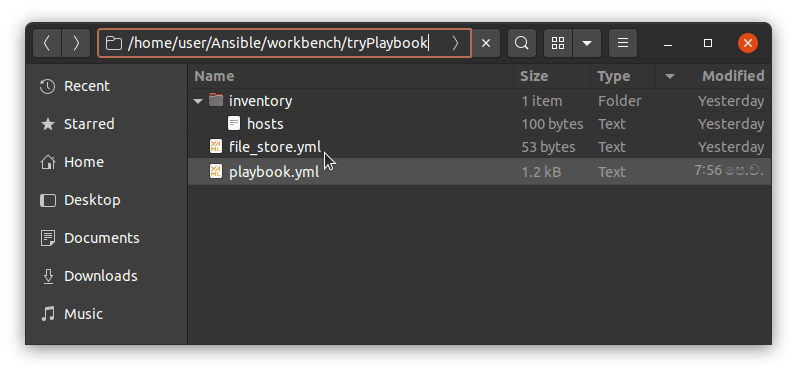
(Don’t worry about the file_store.yml file at this moment it is for one tasks to provide the directory names to create the directories in remote ansible hosts)
This is how the tasks defines in the playbook.yml.
Note : Please note the name ‘playbook’ is optional you can use anyother name also for that.
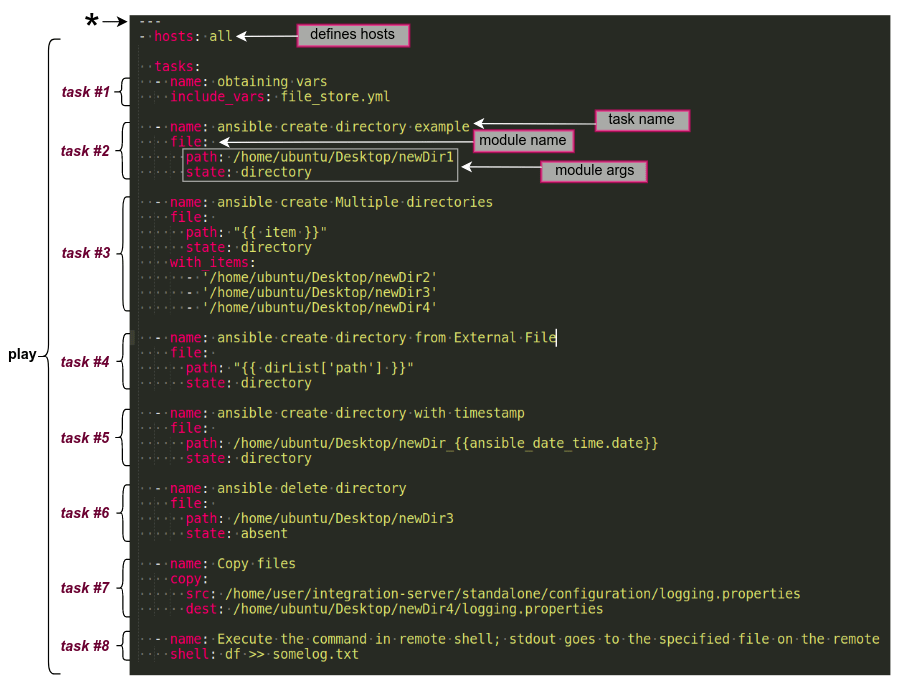
In this case, the playbook file part contains the tasks, hosts etc is called as a “play”. You can define multiple plays in a play book and you can give them a name also. And the connecting user also you can define in there.
eg:
- name: play1
  hosts: webServers
  remote_user: ubuntu
  tasks:
    - name: install httpd # going to install apache
      yum:
        name: httpd
        state: latest
- name: play2
  hosts: dbServers
  remote_user: centos
  tasks:
    - name: install httpd # going to install apache
      yum:
        name: httpd
        state: latest
The hosts parameter refers the Ansible hosts that the play is going to execute on. eg : you can mention the particular server group also in this case. Or you can mention them as all where it will effect to all of the servers in the host file.
eg :
[servers]
server1 ansible_host=192.168.1.15[all:vars]
ansible_python_interpreter=/usr/bin/python3
Zooooming on tasks..
Let’s closer look at the each task
task#1 : Obtaining vars
  - name: obtaining vars
    include_vars: file_store.yml
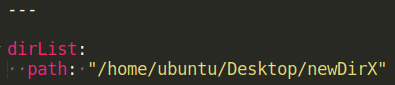
This is a builtin angular module to load the variables that was stored in external file file_store.yml.
In this case variables are stored as above in that file and they can be loaded as “{{ dirList[‘path’] }}”. This is used in task#4.
[ref : https://docs.ansible.com/ansible/latest/collections/ansible/builtin/include_vars_module.html]
task #2 : Ansible create directory
  - name: ansible create directory example
    file:
      path: /home/ubuntu/Desktop/newDir1
      state: directory
Ansible builtin file module is used for this and state directory is to create a directory in the path mentioned (newDir1 is the new direcotory name). If you are using the relative paths, path will be created related to the user directory.
(eg : if the path is path: newParent/newDir1, directory will be created under /home/ubuntu/newParent/newDir1)
[ref : https://docs.ansible.com/ansible/latest/collections/ansible/builtin/file_module.html]
task #3 : Create multiple directories
  - name: ansible create Multiple directories
    file:
      path: "{{ item }}"
      state: directory
    with_items:
      - '/home/ubuntu/Desktop/newDir2'
      - '/home/ubuntu/Desktop/newDir3'
      - '/home/ubuntu/Desktop/newDir4'
In this case file path is given using the list of items mentioned in with_items
[ref : https://docs.ansible.com/ansible/latest/user_guide/playbooks_loops.html]
task#4 : Create directory taking the file name from external source
  - name: ansible create directory from External File
    file:
      path: "{{ dirList['path'] }}"
      state: directory
In this case, we load the path from the external file as discussed in task#1
task#5 : Create directory with timestamp adding to the name
  - name: ansible create directory with timestamp
    file:
      path: /home/ubuntu/Desktop/newDir_{{ansible_date_time.date}}
      state: directory
In this case we have used an ansible playbook variable ansible_date_time to get the date appended to the directory name.
[ref:https://docs.ansible.com/ansible/2.5/user_guide/playbooks_variables.html]
task#6 : Delete directory
  - name: ansible delete directory
    file:
      path: /home/ubuntu/Desktop/newDir3
      state: absent
In this case we delete a created directory using the state as absent
task#7 : Copy files
  - name: Copy files
    copy:
      src: /home/user/Fun/integration-server/standalone/configuration/logging.properties
      dest: /home/ubuntu/Desktop/newDir4/logging.properties
In this case, we copy logging.properties file from Ansible Control Node – Local PC to newDir4 in the remote Ansible Host. For this we have used ansible builtin copy module.
[refer : https://docs.ansible.com/ansible/latest/collections/ansible/builtin/copy_module.html]
task#8 : Execute shell command
  - name: Execute the command in remote shell; stdout goes to the specified file on the remote
    shell: df >> somelog.txt
In this case we execute a shell command. eg : get the disck usage and writ to a file. We have used Ansible builtin shell module for this.
[ref : https://docs.ansible.com/ansible/latest/collections/ansible/builtin/shell_module.html]
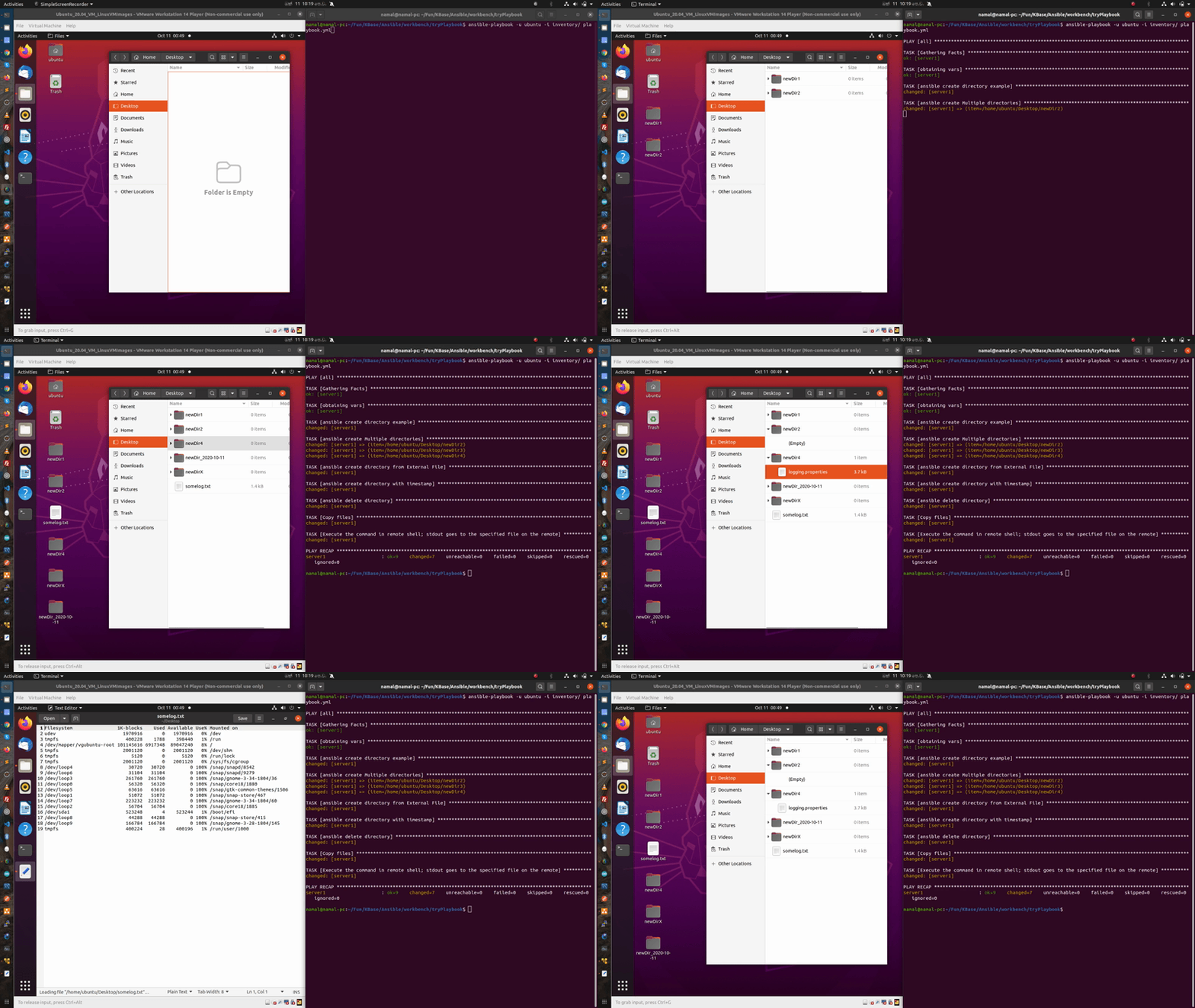
Run the playbook.
Now you can simply run the playbook using below command
$ ansible-playbook -u ubuntu -i inventory/ playbook.yml
Response :
PLAY [all] *
TASK [Gathering Facts] *
ok: [server1]TASK [obtaining vars] **
ok: [server1]TASK [ansible create directory example]
changed: [server1]TASK [ansible create Multiple directories] ***
changed: [server1] => (item=/home/ubuntu/Desktop/newDir2)
changed: [server1] => (item=/home/ubuntu/Desktop/newDir3)
changed: [server1] => (item=/home/ubuntu/Desktop/newDir4)TASK [ansible create directory from External File] *
changed: [server1]TASK [ansible create directory with timestamp] *
changed: [server1]TASK [ansible delete directory]
changed: [server1]TASK [Copy files]
changed: [server1]TASK [Execute the command in remote shell; stdout goes to the specified file on the remote] **
changed: [server1]PLAY RECAP *
server1 : ok=9 changed=7 unreachable=0 failed=0 skipped=0 rescued=0 ignored=0
Note :
You can use prefix ANSIBLE_DEBUG=1 to get debug information.
eg : $ ANSIBLE_DEBUG=1 ansible-playbook -u ubuntu -i inventory/ playbook.yml
Further readings :
- https://docs.ansible.com/ansible/latest/collections/ansible/builtin
- https://www.digitalocean.com/community/tutorial_series/how-to-manage-remote-servers-with-ansible
- https://www.tutorialspoint.com/ansible/ansible_playbooks.htm
- https://techrideradmin.blogspot.com/2018/09/create-directory-in-ansible.html
- https://www.mydailytutorials.com/ansible-create-directory/
- https://www.youtube.com/watch?v=EcnqJbxBcM0&t=141s
 Knowledge Hunter