
1. Get the Cloud Vision API Key (refer this)
- Search for and enable: Cloud Vision API
- Double check: APIs & Services > Enabled APIs
- Then:
APIs & Services > Credentials
Create Credentials > API Key > Create > Copy (as GOOGLE_VISION_API_KEY)
2. Test the Implemenatation
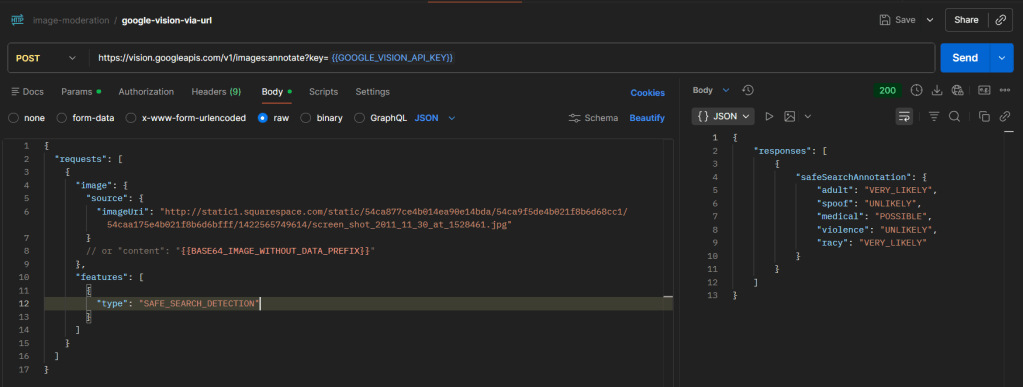
curl --location 'https://vision.googleapis.com/v1/images:annotate?key={{GOOGLE_VISION_API_KEY}}' \--header 'Content-Type: application/json' \--data '{ "requests": [ { "image": { "source": { "imageUri": "http://static1.squarespace.com/static/54ca877ce4b014ea90e14bda/54ca9f5de4b021f8b6d68cc1/54caa175e4b021f8b6d6bfff/1422565749614/screen_shot_2011_11_30_at_1528461.jpg" } }, "features": [ { "type": "SAFE_SEARCH_DETECTION" } ] } ]}'
Sample response :
{ "responses": [ { "safeSearchAnnotation": { "adult": "VERY_LIKELY", "spoof": "UNLIKELY", "medical": "POSSIBLE", "violence": "UNLIKELY", "racy": "VERY_LIKELY" } } ]}
Field Description :
| Field | What it detects |
|---|---|
| adult | Pornography / explicit sexual content |
| racy | Suggestive (not explicit) |
| violence | Physical harm, weapons, blood |
| medical | Medical/surgical content |
| spoof | Fake / manipulated images |
Possible values and meaning :
| Value | Meaning | Practical Interpretation |
|---|---|---|
| UNKNOWN | Model couldn’t determine | Treat as risky / fallback |
| VERY_UNLIKELY | Almost certainly safe | Safe |
| UNLIKELY | Probably safe | Safe |
| POSSIBLE | Might contain content | Review |
| LIKELY | High chance | Block |
| VERY_LIKELY | Almost certain | Block |
 Knowledge Hunter