Implementing Image Moderation with Google Vision

1. Get the Cloud Vision API Key (refer this)

  • Search for and enable: Cloud Vision API
  • Double check: APIs & Services > Enabled APIs
  • Then:
    APIs & Services > Credentials
    Create Credentials > API Key > Create > Copy (as GOOGLE_VISION_API_KEY)

2. Test the Implemenatation

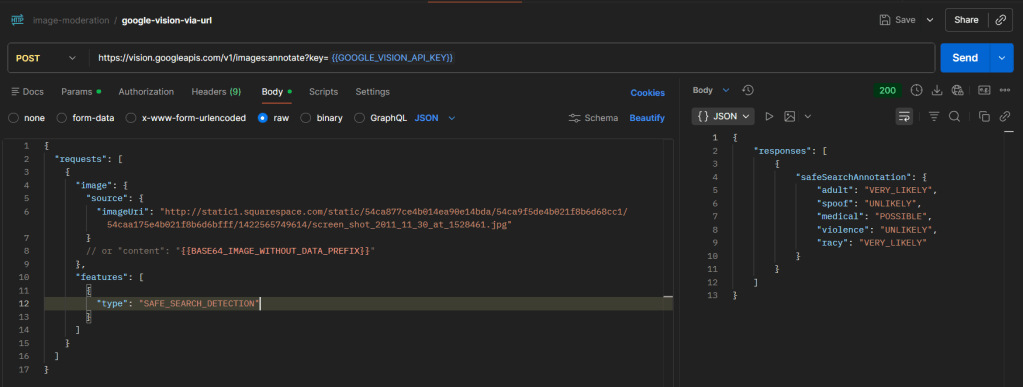
curl --location 'https://vision.googleapis.com/v1/images:annotate?key={{GOOGLE_VISION_API_KEY}}' \
--header 'Content-Type: application/json' \
--data '{
"requests": [
{
"image": {
"source": {
"imageUri": "http://static1.squarespace.com/static/54ca877ce4b014ea90e14bda/54ca9f5de4b021f8b6d68cc1/54caa175e4b021f8b6d6bfff/1422565749614/screen_shot_2011_11_30_at_1528461.jpg"
}
},
"features": [
{
"type": "SAFE_SEARCH_DETECTION"
}
]
}
]
}'

Sample response :

{
"responses": [
{
"safeSearchAnnotation": {
"adult": "VERY_LIKELY",
"spoof": "UNLIKELY",
"medical": "POSSIBLE",
"violence": "UNLIKELY",
"racy": "VERY_LIKELY"
}
}
]
}

Field Description :

FieldWhat it detects
adultPornography / explicit sexual content
racySuggestive (not explicit)
violencePhysical harm, weapons, blood
medicalMedical/surgical content
spoofFake / manipulated images

Possible values and meaning :

ValueMeaningPractical Interpretation
UNKNOWNModel couldnโ€™t determineTreat as risky / fallback
VERY_UNLIKELYAlmost certainly safeSafe
UNLIKELYProbably safeSafe
POSSIBLEMight contain contentReview
LIKELYHigh chanceBlock
VERY_LIKELYAlmost certainBlock

#cloud, #google, #image_moderation

Building a Simple Translation REST API using Google Cloud Translation API, FastAPI, and Python

1. Python Code

Create a file named: google_cloud_tr.py

from fastapi import FastAPI
from google.cloud import translate_v3 as translate
app = FastAPI()
PROJECT_ID = "<your-project-id>"
LOCATION = "global"
@app.get("/translate")
def translate_text(text: str, target: str):
client = translate.TranslationServiceClient()
parent = f"projects/{PROJECT_ID}/locations/{LOCATION}"
response = client.translate_text(
request={
"parent": parent,
"contents": [text],
"mime_type": "text/plain",
"target_language_code": target,
}
)
return {
"translatedText": response.translations[0].translated_text
}

2. Provide the Google Cloud JSON Key as an Environment Variable

  • Search for and enable: Cloud Translation API
  • Double check: APIs & Services > Enabled APIs
  • Then: IAM & Admin > Service Accounts

Steps:

  • Create a Service Account
  • Add one of these roles:
    • Cloud Translation API User
    • Cloud Translation Admin
    • or a higher role
  • Create and download the JSON key (e.g.: service-account.json)
  • Save it inside your project directory (D:\path\to\directory\google-cloud-translation\)

Provide the JSON key path as an environment variable:

$env:GOOGLE_APPLICATION_CREDENTIALS="D:\path\to\directory\google-cloud-translation\service-account.json"

3. Run the API

Create and activate a virtual environment:

python -m venv venv
.\venv\Scripts\Activate.ps1

Install prerequisites:

pip install google-cloud-translate fastapi uvicorn

Run the API:

uvicorn google_cloud_tr:app --reload

4. Test the Result

Request:

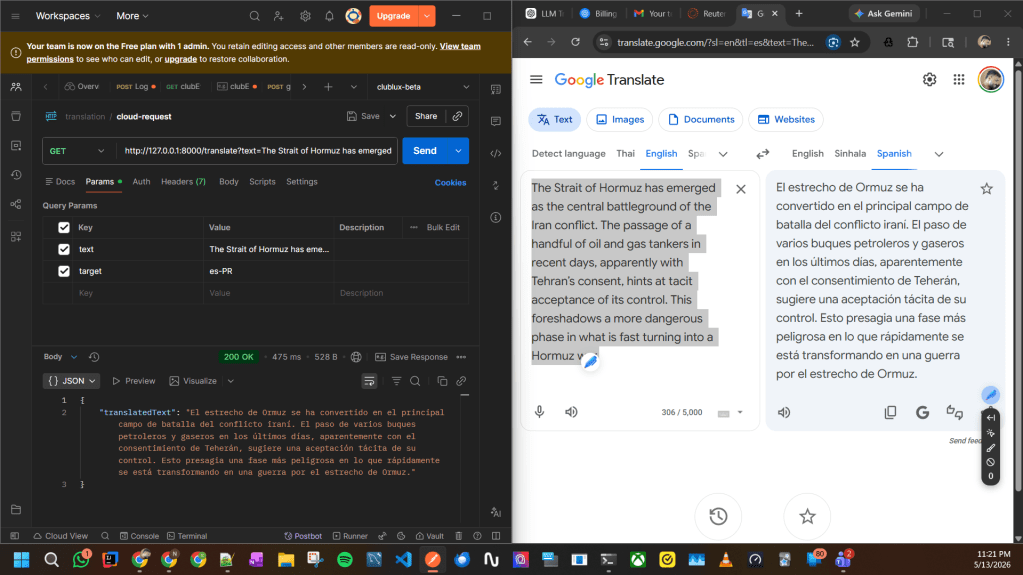
GET http://127.0.0.1:8000/translate?text=The Strait of Hormuz has emerged as the central battleground of the Iran conflict.&target=es

Example response:

{
"translatedText": "El Estrecho de Ormuz ha surgido como el principal campo de batalla del conflicto con Irรกn."
}

Note:

Google Cloud Translation mainly handles language translation.
For advanced regional localization (such as Puerto Rico Spanish, slang, or tone-specific translation), an LLM-based approach like OpenAI may provide more natural results. Please refer this.

#fastapi, #python