
1. Python code
Create a file named: openai_tr.py
from fastapi import FastAPIfrom pydantic import BaseModelfrom openai import OpenAIimport osimport logging# Logging Configurationlogging.basicConfig( level=logging.INFO, format="%(asctime)s %(levelname)s %(name)s : %(message)s")logger = logging.getLogger(__name__)# OpenAI Clientclient = OpenAI( api_key=os.getenv("OPENAI_API_KEY"))# FastAPI Appapp = FastAPI()# Request Modelclass TranslationRequest(BaseModel): text: str targetLanguage: str# Locale MappingLOCALE_MAP = { "es-PR": "Puerto Rico Spanish", "es-MX": "Mexican Spanish", "es-ES": "Spain Spanish", "es-US": "United States Spanish", "fr-CA": "Canadian French", "pt-BR": "Brazilian Portuguese"}# Translation APIapp.post("/api/translations")def translate(request: TranslationRequest): locale_name = LOCALE_MAP.get( request.targetLanguage, request.targetLanguage ) prompt = f"""Translate the following text into natural {locale_name}.Rules:- Preserve tone and meaning- Keep placeholders unchanged- Keep HTML tags unchanged- Avoid robotic translation- Return only the translated textText:{request.text}""" # Logging logger.info("======================================") logger.info("Translation Request Received") logger.info("Target Language: %s", request.targetLanguage) logger.info("Locale Name: %s", locale_name) logger.info("Original Text: %s", request.text) logger.info("Prompt:\n%s", prompt) try: response = client.chat.completions.create( model="gpt-5", messages=[ { "role": "system", "content": "You are a professional localization translator." }, { "role": "user", "content": prompt } ] ) translated_text = response.choices[0].message.content logger.info("Translated Text: %s", translated_text) logger.info("======================================") return { "translatedText": translated_text, "targetLanguage": request.targetLanguage } except Exception as e: logger.exception("Translation Error Occurred") return { "error": str(e) }
2. Provide the OpenAI API key as an environment variable
Go to the OpenAI API keys page and create a new secret key. OpenAI’s quickstart also uses the OPENAI_API_KEY environment variable pattern for SDK authentication.[see]
$env:OPENAI_API_KEY="<your api key>"
3. Run the API
Create and activate a virtual environment:
python -m venv venv.\venv\Scripts\Activate.ps1
Install prerequisites:
pip install openai fastapi uvicorn
Run the API:
uvicorn openai_tr:app --reload
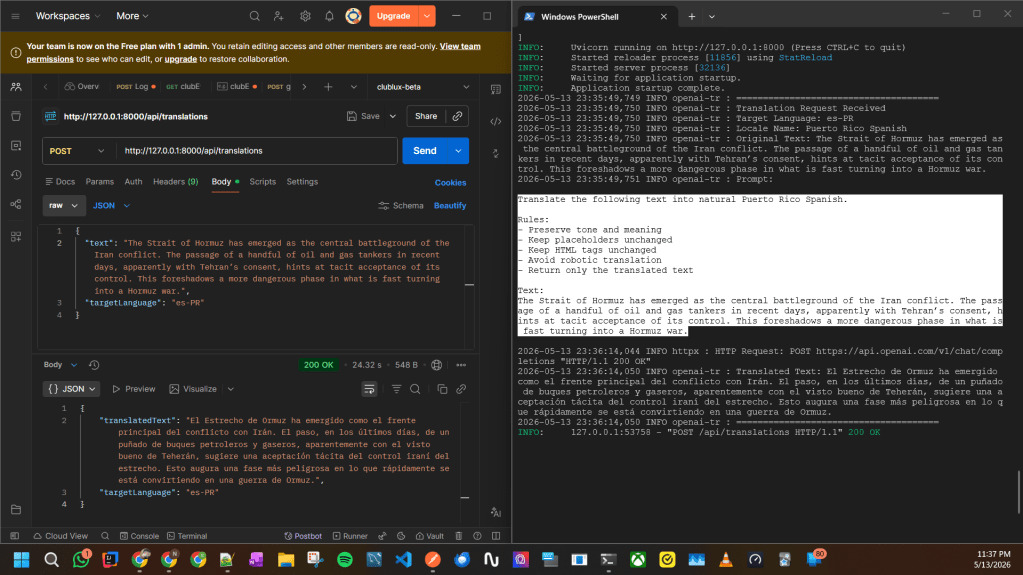
4. Test the result
POST request:
POST http://127.0.0.1:8000/api/translations
Body:
{ "text": "The Strait of Hormuz has emerged as the central battleground of the Iran conflict. The passage of a handful of oil and gas tankers in recent days, apparently with Tehran’s consent, hints at tacit acceptance of its control. This foreshadows a more dangerous phase in what is fast turning into a Hormuz war.", "targetLanguage": "es-PR"}
 Knowledge Hunter